
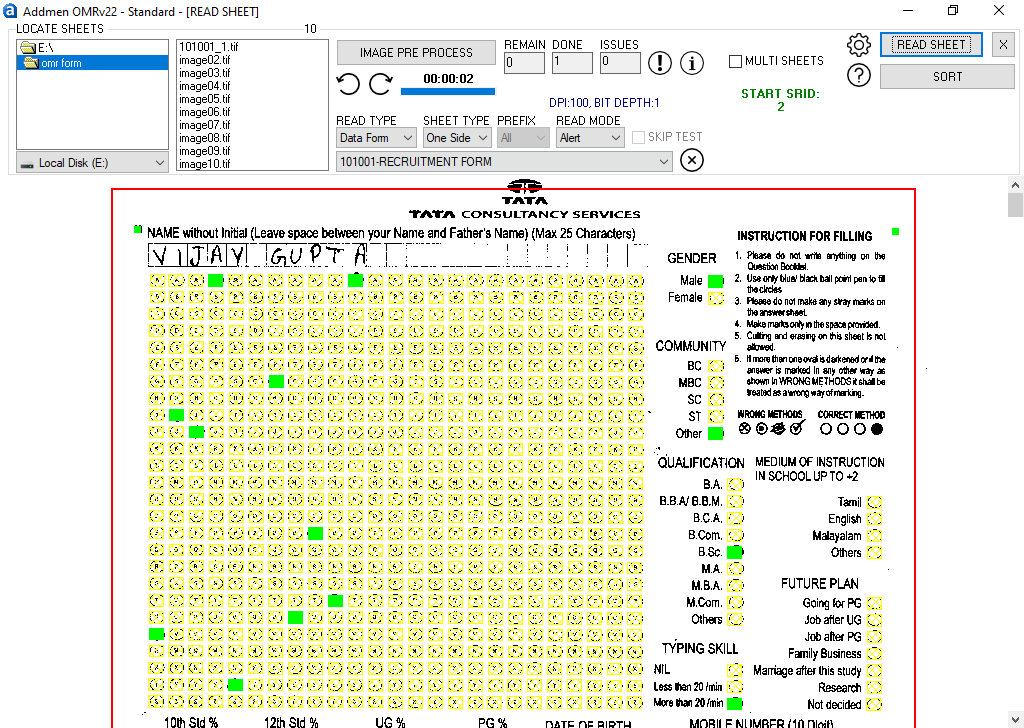
The OMR Form Reader is a specialized variant of Addmen’s OMR software designed not for scoring tests, but for capturing data from forms — such as admission forms, application forms, survey questionnaires, feedback forms, registration forms, and more.
Unlike test-oriented OMR checkers, which evaluate correct/incorrect answers, the OMR Form Reader focuses on extracting structured data and converting it into usable digital formats. It helps automate what would otherwise be tedious manual data entry.
The software combines OMR (Optical Mark Recognition) with OCR (Optical Character Recognition) and ICR (Intelligent Character Recognition) to handle printed text, handwritten fields, barcodes, images, and bubble marks—all in one integrated system.
Form Scanning / Image Capture
You scan the physical forms using any standard scanner. The software can accept common image formats (TIFF, JPEG, PNG).
It can automatically correct skew or tilt in scanned sheets to ensure accurate recognition.
OMR Module — Bubble / Block Detection
The system reads filled blocks or bubbles (marks) on the form—useful for checkboxes, options in a questionnaire, Yes/No responses, multiple selections, etc.
OCR / Printed Text Extraction
For pre-printed numbers (such as form numbers, IDs, printed labels), the OCR engine reads and captures them into text fields. This is particularly useful when forms already have barcode or number fields.
ICR / Handwriting Recognition
For handwritten entries—such as names, addresses, comments—the ICR module attempts to interpret and digitize the handwritten content into text (or flag ambiguous entries for manual review).
Image Capture (Photo / Signature Fields)
The software can also read and store embedded images from the form (e.g. a photograph of the applicant, scanned signature). These are captured and stored along with the relevant record (linked by form number or ID).
Data Aggregation & Export
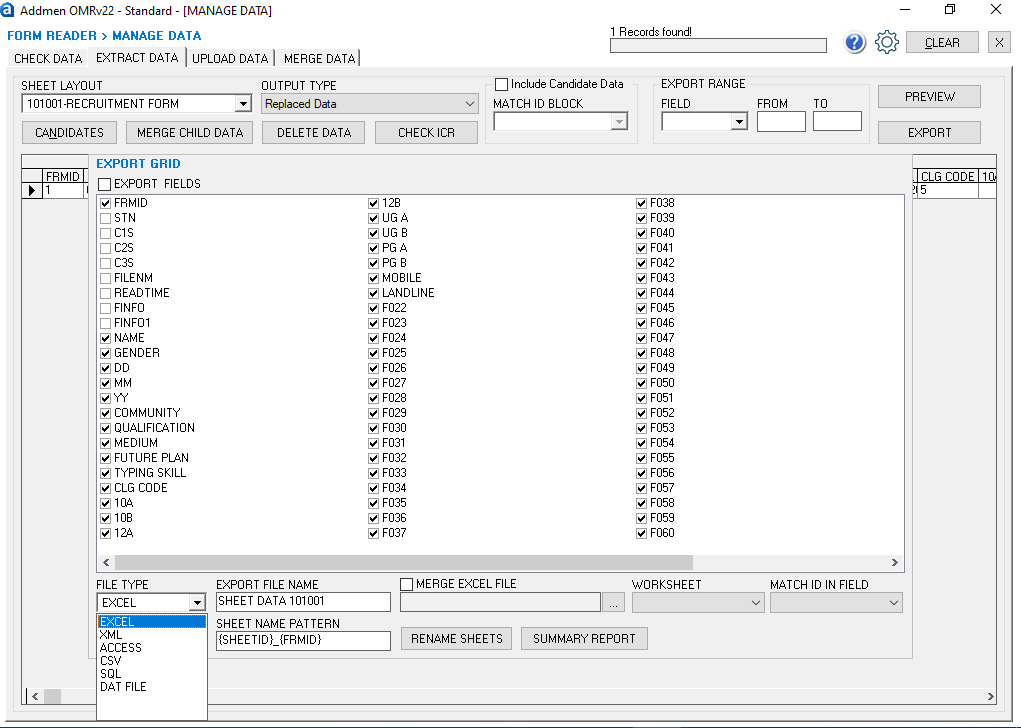
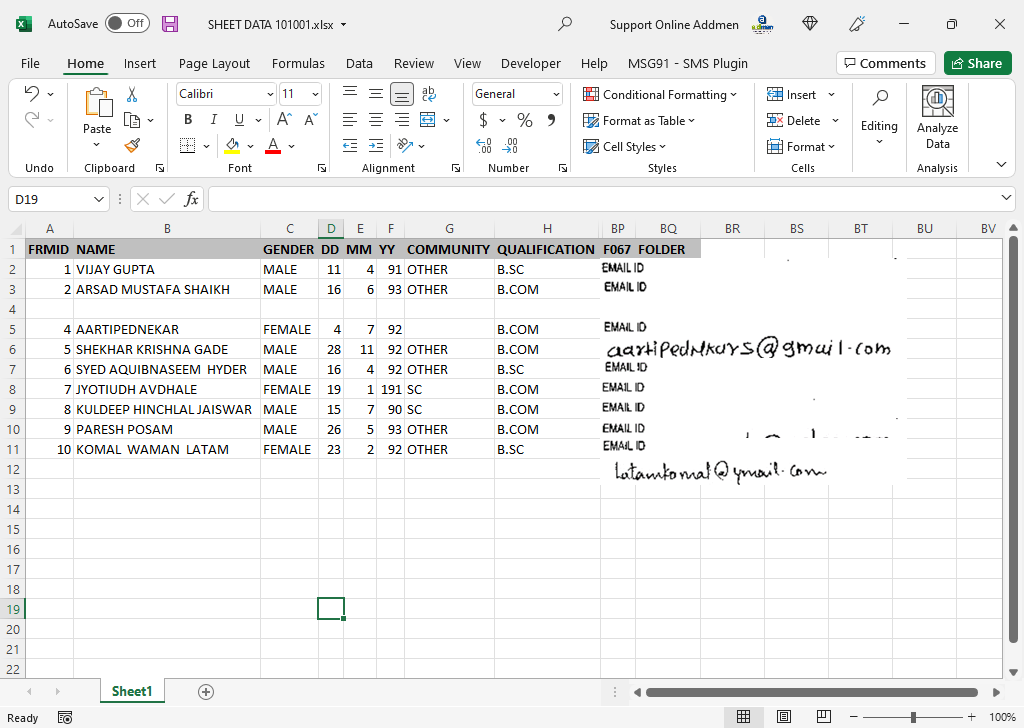
After reading, all captured data—marks, printed text, handwritten text, and images—is aggregated and can be exported in formats such as Excel, CSV, XML, SQL databases, Access, and others.
Template / Form Design Integration
The OMR Form Reader includes a built‑in form designer, enabling you to create or customize different kinds of forms (admission, survey, registration) with precise layout definitions: define bubble zones, text fields, image fields, etc.
Multi-Modal Data Capture: Combines OMR, OCR, ICR, and image reading in one system to handle different kinds of form data.
Flexible Export Options: Export to Excel, CSV, XML, SQL, Access or any required format — making downstream integration easier.
High Accuracy & Reliability: Even with moderate scanning variances or tilt, the software auto-corrects misalignment and avoids rejecting sheets in most cases.
Efficiency & Cost Savings: Automates form data processing, significantly reduces manual data entry time, and minimizes human errors.
Selective Processing / Export: Process only certain fields or zones of the form; export only needed data, thereby managing data size and relevance.
Offline Operation: The system does not require an internet connection; you can run it locally on desktop machines (Windows 7/8/10, XP, Vista compatible).
Scalability & Speed: Capable of processing large numbers of forms quickly—even thousands in a short time—without degradation in speed.
Affordable Alternative to Hardware Scanners: By leveraging your existing scanner hardware and using software intelligence, you avoid the high cost of OMR scanning machines.
Use high-contrast printing (black ink on white paper) for bubble zones and printed text fields to improve recognition.
For handwriting fields (ICR zones), instruct respondents to write clearly, in uppercase or block letters, with proper spacing.
Test a pilot batch of forms to validate layout alignment, clarity, and recognition accuracy before full deployment.
Avoid extreme skew in scans; while the software can correct moderate tilt, severe distortion can reduce accuracy.
Flag uncertain or ambiguous entries for manual review rather than relying solely on automatic recognition.
For forms with images or signatures, ensure the image quality is high and not blurred during scanning.
Maintain consistent scanning settings (resolution, brightness, contrast) within the same batch to ensure uniform recognition results.
Admission / Application Processing
Collect applicant details, responses, choices, and submit the data automatically to your database without needing manual entry.
Surveys & Feedback Forms
Read multiple-choice answers, free-text responses, comments, and ratings across large respondent groups.
Exam Registration / Enrollment Forms
Capture candidate details, exam codes, subject choices, personal info in large volumes efficiently.
Event Registration / Membership Forms
Automate collection of personal data, preferences, selections, and signatures from physical forms.
Any Organized Data-Gathering Process
Wherever structured or semi‑structured forms are used, the OMR Form Reader can help convert physical data into digital records.
Addmen Group Copyright 2026. All Rights Reserved.
